
NCLWiFi com: Complete Guide to Norwegian Cruise Line Wi-Fi (Login, Packages & Setup)

NCLWiFi com is the onboard Wi-Fi login portal for Norwegian Cruise Line (NCL) ships. To connect to Wi-Fi on any NCL cruise ship, passengers join the NCL_Internet_Bliss network on their device, open a browser, type login.com in the address bar, and select an internet package. NCL offers 2 Wi-Fi packages: the Unlimited Wi-Fi Package at $29.99 per day and the Unlimited Premium Wi-Fi Package at $39.99 per day.
I took my first NCL cruise out of Miami 2 years ago and spent the first 45 minutes onboard trying to figure out why my phone wouldn’t connect to the internet. The process is simple once you know the steps — but the onboard instructions aren’t always clear, and the login portal behaves differently from any Wi-Fi you’ve used on land. This guide covers every step: how to connect, how to log in, which package to buy, what works and what doesn’t, and how to log out properly so you don’t burn through your session time while you’re asleep.
How to Connect to NCLWiFi com — Step-by-Step
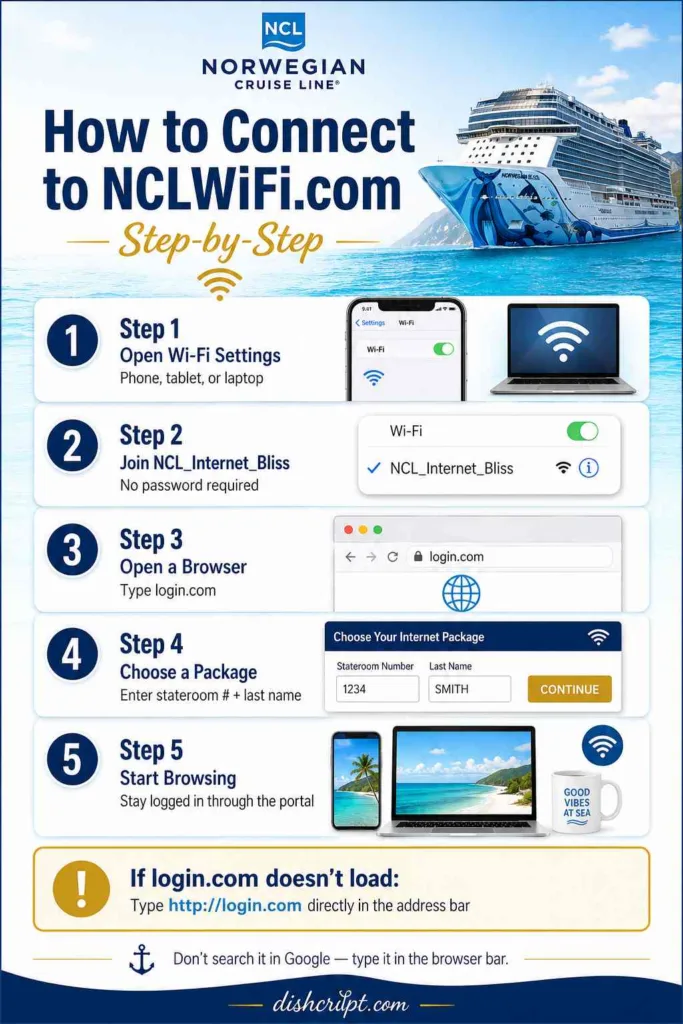
Connecting to Wi-Fi on a Norwegian Cruise Line ship takes 5 steps:
Step 1: Open your device’s Wi-Fi settings Go to the Wi-Fi settings on your phone, tablet, or laptop. The process works on Apple (iPhone, iPad, Mac), Google (Android, Chromebook), and Microsoft (Windows) devices.
Step 2: Select the NCL_Internet_Bliss network Find NCL_Internet_Bliss in your available Wi-Fi networks list and connect to it. The network is open — no password is required to join. Your device connects to the ship’s satellite-based internet system.
Step 3: Open a browser and type login.com Open any web browser (Safari, Chrome, Firefox, Edge) and type login.com in the address bar. This redirects you to the NCLWiFi.com login portal — the main page where you select a package, register, and activate your internet access.
Step 4: Select a package and register The NCLWiFi com login portal displays the available internet packages. Select either the Unlimited Wi-Fi Package or the Unlimited Premium Wi-Fi Package, enter your stateroom number and last name, and complete the purchase. Your activation code is tied to your stateroom account.
Step 5: Start browsing After package activation, your device has internet access for the duration of your purchased plan. The connection stays active as long as you remain logged in through the portal.
What if login.com doesn’t load? Try typing http://login.com (with the http:// prefix) directly in the address bar — not in a search engine. Some browsers default to searching Google rather than navigating to the URL. Typing the full http:// prefix forces the browser to load the portal directly.
NCLWiFi com Login — How to Sign In
To log in to NCLWiFi.com, navigate to login.com while connected to the NCL_Internet_Bliss network and enter your credentials:
| Login Field | What to Enter |
|---|---|
| Stateroom number | Your cabin number (found on your keycard) |
| Last name | The last name on the stateroom booking |
| Package selection | Choose Unlimited or Unlimited Premium |
| Payment | Charged to your onboard stateroom account |
NCLWiFi com Login Password
NCLWiFi com does not use a traditional password. The login portal authenticates passengers using stateroom number and last name — there is no separate Wi-Fi password to enter. The NCL_Internet_Bliss network itself is open (no network password), and access is controlled through the package purchase on the login portal.
Passengers searching for “nclwifi com login password” are typically looking for the network password — there isn’t one. Connect to NCL_Internet_Bliss (open network), navigate to login.com, and authenticate through the portal with your stateroom number.
NCLWiFi com Register — First-Time Setup
First-time registration on NCLWiFi com happens during your initial login. When you access the portal for the first time on a voyage, the system prompts you to select a package and register your device. After registration, subsequent logins on the same device only require confirming your stateroom number — the portal remembers your device for the duration of the cruise.
NCL Wi-Fi Packages — Cost and What Each Includes
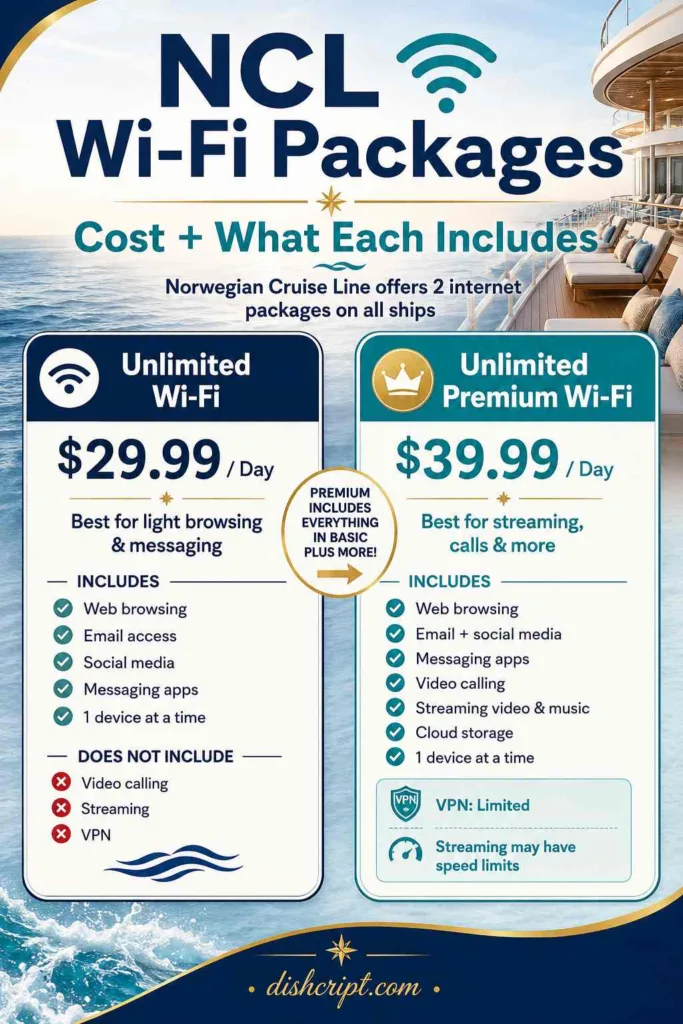
Norwegian Cruise Line offers 2 internet packages on all ships:
Unlimited Wi-Fi Package — $29.99 Per Day
| Feature | Included? |
|---|---|
| Web browsing (Google, news sites, etc.) | Yes |
| Email access (Gmail, iCloud, Yahoo, Outlook) | Yes |
| Social media browsing (Facebook, Instagram, Twitter) | Yes |
| Messaging apps (WhatsApp, iMessage, Telegram, WeChat, Viber) | Yes |
| Video calling (FaceTime, Skype, Zoom, Google Duo) | No |
| Streaming (Netflix, YouTube, Spotify, etc.) | No |
| VPN access | No |
| Number of devices | 1 device at a time |
The Unlimited Wi-Fi Package at $29.99 per day handles standard browsing, email, social media, and text-based messaging. It does not support video calls, streaming services, or VPN connections. This package is the right choice for passengers who want to stay connected at sea for communication and light browsing without needing to stream video or music.
Unlimited Premium Wi-Fi Package — $39.99 Per Day
| Feature | Included? |
|---|---|
| Web browsing | Yes |
| Email access (Gmail, iCloud, Yahoo, Outlook) | Yes |
| Social media (Facebook, Instagram, Twitter, Snapchat, TikTok) | Yes |
| Messaging apps (WhatsApp, iMessage, Telegram, WeChat, Viber) | Yes |
| Video calling (FaceTime, Skype, Zoom, Google Duo) | Yes |
| Streaming video (Netflix, Hulu, Amazon Prime, YouTube) | Yes — with speed limitations |
| Streaming music (Spotify, Apple Music, Pandora, iHeart Radio, SoundCloud, Google Play Music) | Yes |
| VPN access | Limited — some VPNs work, some are blocked |
| Cloud storage (Dropbox, Google Drive, iCloud) | Yes |
| Number of devices | 1 device at a time |
The Unlimited Premium Wi-Fi Package at $39.99 per day adds video calling, music streaming, video streaming, and cloud storage access. The $10 daily difference between the 2 packages covers streaming capability — the core decision point for most passengers.
Does Norwegian Cruise Have Free Wi-Fi?
No, Norwegian Cruise Line does not offer free Wi-Fi. All internet access on NCL ships requires purchasing either the $29.99/day Unlimited Wi-Fi Package or the $39.99/day Unlimited Premium Wi-Fi Package. NCL occasionally includes Wi-Fi packages as part of promotional “Free at Sea” offers that bundle internet, drinks, shore excursions, and specialty dining — but the Wi-Fi is bundled into the cruise fare, not truly free as a standalone perk.
How to Log Out of NCLWiFi.com
Log out of NCLWiFi com after each session by typing logout.com in your browser’s address bar. This disconnects your device from the active internet session and stops your package from running while you’re not using it.
Why Logging Out Matters
NCL Wi-Fi packages charge per day, not per session — but logging out after each session prevents 2 problems:
- Background data consumption — apps running in the background (email sync, social media refresh, cloud backup, app updates) consume bandwidth and slow your connection without you actively using the internet
- Device connection limit — each NCL Wi-Fi package allows 1 device at a time; log out of your phone to switch to your laptop or tablet, then log back in on the new device through login.com
To log out: Open any browser, type logout.com in the address bar, and the portal confirms your session has ended. Close the browser and disconnect from the NCL_Internet_Bliss network in your device Wi-Fi settings.
To log back in: Reconnect to NCL_Internet_Bliss, type login.com, and your stateroom credentials are pre-filled from your initial registration.
What Works and What Doesn’t on NCL Wi-Fi
Apps and Services That Work on NCL Wi-Fi
Standard package ($29.99/day):
- Email: Gmail, iCloud Mail, Yahoo Mail, Outlook — all work for sending and receiving text emails; large attachments may time out
- Messaging: WhatsApp (text and voice messages), iMessage (text), Telegram, WeChat, Viber — text messaging works reliably; voice messages upload slowly
- Social media browsing: Facebook, Instagram (feed loading and stories), Twitter — image-heavy feeds load slower than on land but are functional
- Web browsing: Google searches, news sites (CBC News, CTV News, Fox News), weather, blogs — standard web pages load at usable speeds
- Cloud email access: Outlook web, Gmail web interface — functional for text-based email management
Premium package ($39.99/day) adds:
- Video calling: FaceTime, Skype, Zoom, Google Duo — video calls connect but quality depends on satellite signal strength; expect lower resolution than land-based calls
- Streaming video: Netflix, Hulu, Amazon Prime, HBOMax, Disney+, ESPN+, Peacock, Paramount+, YouTube — streams load but buffer frequently; lower the streaming quality to 480p or below for the most reliable playback
- Streaming music: Spotify, Apple Music, Pandora, iHeart Radio, SoundCloud, Google Play Music — music streaming works more consistently than video because it requires less bandwidth
Apps and Services That Don’t Work Reliably on NCL Wi-Fi
- VPN connections — most VPN services are blocked or throttled on NCL’s satellite network; some VPNs connect intermittently, but consistent VPN access is not reliable on either package
- Large file uploads or downloads — uploading photos to Dropbox or Google Drive works for individual images but fails on batch uploads; downloading large files (apps, movies for offline viewing) times out frequently
- High-definition video streaming — 1080p and 4K streaming on Netflix, YouTube, or any platform will buffer constantly; reduce stream quality to 480p or lower
- Online gaming — latency on satellite internet makes real-time multiplayer gaming impractical; turn-based games and apps that sync data periodically work fine
- Software updates — disable automatic app updates and system updates before boarding; a single iOS or Android system update can consume your entire bandwidth allocation for hours
NCL Wi-Fi Speed — What to Realistically Expect
NCL cruise ship Wi-Fi operates on satellite internet, which delivers significantly lower speeds than land-based broadband or cellular data. Realistic speed expectations on NCL Wi-Fi:
| Activity | Speed Experience |
|---|---|
| Text email | Fast — sends and receives within seconds |
| Web browsing | Moderate — pages load in 3–8 seconds; image-heavy pages slower |
| Social media scrolling | Moderate — feeds load, images render with 1–3 second delays |
| WhatsApp text messages | Fast — near-instant delivery |
| WhatsApp voice messages | Moderate — 5–15 second upload per message |
| Video calling (Zoom/FaceTime) | Slow — lower resolution, occasional drops; works but not smooth |
| Music streaming | Moderate — 2–5 second initial buffer, then mostly continuous |
| Video streaming (480p) | Slow — frequent 3–10 second buffers; watchable but not seamless |
| Video streaming (1080p+) | Unreliable — constant buffering; not recommended |
Signal strength varies by location on the ship. Upper decks and open-air areas typically receive stronger satellite signal than interior cabins and lower decks. The 24-hour Internet café on most NCL ships offers wired connections and dedicated terminals that sometimes provide more consistent speeds than the onboard Wi-Fi network.
Speed drops during peak usage hours. When the majority of passengers are online simultaneously — typically early evening (6:00–9:00 PM) after port days — network congestion slows all connections. Early morning (6:00–8:00 AM) and late night (after 11:00 PM) offer the fastest speeds as fewer passengers are online.
NCLWiFi com Troubleshooting — Common Problems and Fixes
Problem: Login.com Won’t Load
Fix: Type the full URL http://login.com (including http://) in the address bar — not in a search engine. Clear your browser cache, close all tabs, and try again. Switch browsers, if the issue persists (try Safari, Chrome, or Firefox). Confirm you’re connected to NCL_Internet_Bliss in your Wi-Fi settings — not your cabin neighbor’s hotspot or a cached network from a previous port stop.
Problem: Frequent Disconnections
Fix: NCLWiFi.com frequent disconnections typically result from the ship’s satellite connection dropping during repositioning or weather interference. Wait 2–3 minutes and reconnect. Log out (type logout.com), disconnect from NCL_Internet_Bliss in Wi-Fi settings, reconnect, and log back in through login.com. Disable any VPN running on your device — VPNs cause the NCL network to drop connections repeatedly.
Problem: Can’t Switch Devices
Fix: NCL Wi-Fi packages allow 1 device at a time. Log out on your current device by typing logout.com before attempting to log in on a different device. The system takes 1–2 minutes to release the previous session. Wait 2 minutes after logging out, then log in on the new device through login.com.
Problem: Streaming Won’t Load on Standard Package
Fix: Streaming video and music are not included in the $29.99/day Unlimited Wi-Fi Package. Upgrade to the $39.99/day Unlimited Premium Wi-Fi Package through the NCLWiFi.com portal — the upgrade can be purchased mid-voyage at guest services or through the portal. The price difference is $10/day.
Problem: Apps Won’t Sync or Update
Fix: Disable automatic app updates, iCloud backup, Google Photos sync, and Dropbox camera upload before connecting to NCL Wi-Fi. Background syncing consumes bandwidth and slows active browsing. On iPhone, go to Settings → App Store → disable “App Updates.” On Android, go to Play Store → Settings → disable “Auto-update apps.”
NCL Wi-Fi Tips — 8 Ways to Get the Most From Your Package
8 practical tips for better NCL Wi-Fi performance:
- Log out after every session — type logout.com when you finish browsing; this prevents background apps from consuming your bandwidth while you’re at the pool or in the dining room
- Disable background app refresh — turn off automatic syncing for email, photos, cloud storage, and app updates before connecting to NCL_Internet_Bliss
- Download content before boarding — download Netflix shows, Spotify playlists, podcasts, and maps to your device before the cruise; onboard Wi-Fi handles offline content playback without any internet usage
- Use messaging apps instead of calling — WhatsApp and iMessage text messages work reliably on the $29.99 standard package; save the $10/day premium upgrade unless you specifically need video calling or streaming
- Browse during off-peak hours — early morning (6:00–8:00 AM) and late night (after 11:00 PM) offer the fastest speeds as network congestion drops
- Lower streaming quality to 480p — reduce Netflix, YouTube, and all video apps to the lowest quality setting; 480p streams with intermittent buffering while 1080p fails consistently
- Use the 24-hour Internet café — most NCL ships have a dedicated Internet café with terminals and sometimes wired connections; the terminals occasionally deliver more consistent speeds than the wireless network
- Pre-book Wi-Fi packages online before the cruise — NCL occasionally offers discounted Wi-Fi package pricing when purchased before embarkation through ncl.com; onboard pricing is the full $29.99/$39.99 per day rate
Is NCL Wi-Fi Worth the Cost?
NCL Wi-Fi is worth the cost for 3 types of passengers:
The $29.99/day standard package is worth it for passengers who want to send daily messages to family, check email, and post a few photos to Instagram or Facebook. The standard package handles communication needs without the premium price. Over a 7-day cruise, the standard package costs $209.93 total.
The $39.99/day premium package is worth it for passengers who want to video call home, stream music during sea days, or need to watch specific content on Netflix or YouTube. Over a 7-day cruise, the premium package costs $279.93 total.
Neither package is worth it for passengers who want to fully disconnect for the week. The onboard NCL app (which works on the ship’s local network without an internet package) handles restaurant reservations, activity schedules, and onboard messaging between staterooms — no internet package required for onboard ship functions.
A Final Word From Someone Who Figured This Out the Hard Way
NCL Wi-Fi works. It’s not fast. It’s not cheap. And the login process through login.com confused me for longer than I’d like to admit on my first cruise. But once you understand that the NCL_Internet_Bliss network is open, login.com is the portal, logout.com saves your bandwidth, and the $29.99 standard package handles 90% of what most people actually need — the whole system makes sense.
Download everything you want to watch before you board. Use WhatsApp for communication. Log out when you’re not actively browsing. And accept that satellite internet in the middle of the ocean operates at satellite internet speeds — adjust your expectations and the experience is perfectly functional.